
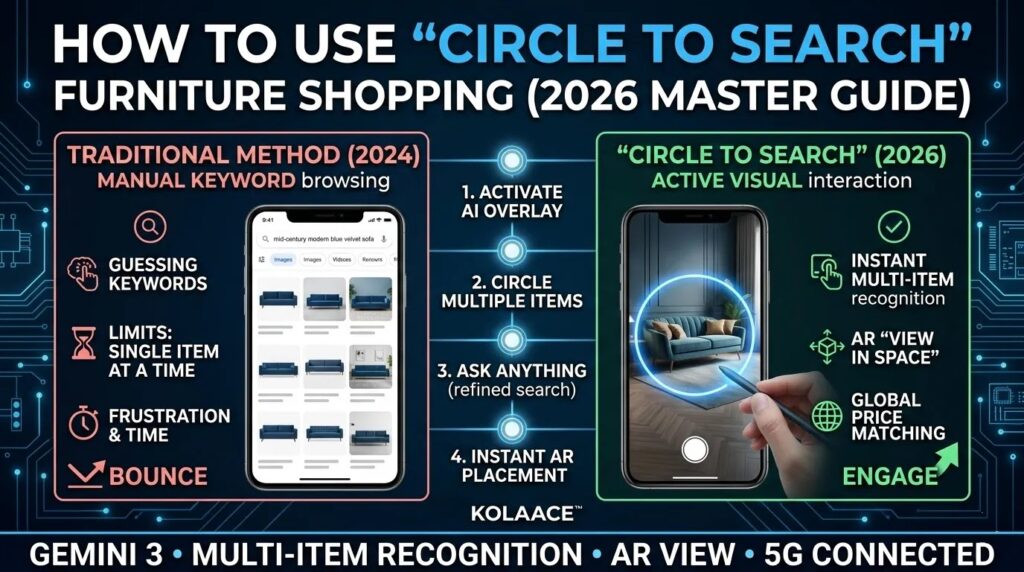
By March 2026, Circle to Search has moved beyond being a simple lookup tool. It is now a full-scale Interior Design Assistant powered by Gemini 3. Gone are the days of trying to describe a “scalloped edge velvet sofa” in a search bar. Now, if you see it on your screen—whether in a Netflix show, a TikTok, or a travel blog—you simply circle it to own it.
The latest 2026 update introduced Multi-Item Recognition. This allows users to highlight a complex lifestyle image and receive a breakdown of every individual component. For furniture enthusiasts, this is the ultimate “get the look” hack, bridging the gap between inspiration and reality instantly.
The Evolution of Visual Search (2024 vs. 2026)
The difference between the original release and the 2026 iteration is Contextual Reasoning. The AI no longer just finds “similar images”; it identifies the exact brand, model, and current stock levels across global retailers.
| Feature | Circle to Search (2024) | Circle to Search (2026) |
|---|---|---|
| Search Capacity | Single item at a time. | Multi-item simultaneous recognition. |
| AI Backbone | Basic Image Matching. | Gemini 3 Agentic Reasoning. |
| AR Integration | Redirects to browser. | Instant “View in Space” AR overlay. |
Market Growth: Visual Search in E-Commerce
The furniture market has seen a massive 40% increase in conversion rates for users who utilize visual AI tools like Circle to Search, leading to a projected $39.75 Billion market value in 2026.
E-Commerce Furniture Market Growth (2024-2026)
*Figures in USD Billions. Source: 2026 Global Retail AI Report.*
Step-by-Step: Searching for Furniture Like a Pro
1. Activate the AI Overlay
On your 2026 Android device (Pixel 10, Galaxy S26), long-press the Navigation Bar or the Home Button. The screen will shimmer with a blue/purple gradient, indicating that the Gemini-powered search layer is active.
2. The “Multi-Circle” Gesture
Instead of just circling one chair, you can now scribble over an entire dining set.
- Circle the Table: Finds the primary piece.
- Tap the Chairs: Gemini 3 recognizes these are secondary items and adds them to a “Shopping Collection” tray at the bottom of the screen.
3. Conversational Refinement
Once you’ve circled the furniture, use the Ask Anything bar at the bottom.
“Find this exact sofa but in performance-grade leather under $2,000.”
Gemini will filter the visual results in real-time based on your text prompt.
4. Instant AR Placement (“View in Space”)
The biggest breakthrough in 2026 is the one-tap AR. In the search results, look for the “View in your room” button. This triggers your phone’s LiDAR scanner to place a digital twin of that furniture piece in your actual living room with physics-accurate lighting and scale.
Conclusion: The Future of Interior Design
Circle to Search has democratized interior design. It allows everyday users to source professional-grade furniture from casual browsing. By mastering the Gemini 3 Multi-Item update, you can build your dream home one circle at a time.